
Speechify review (2026): is it worth it?
Every score comes from the same published brief, with raw outputs downloadable where a test has run. We may earn a commission on links — it never moves a score or a rank.
Not benched yet. Everything on this page is verified desk research — pricing, plan limits and licence terms read off Speechify’s own pages on Jul 3, 2026 (2 primary sources, listed at the bottom). We have not yet run our standard task — the 90-second narration brief — so there is no measured output or timing here, and the scores are provisional. How we test
Quick answer
Speechify verdict: The fastest path from written content to listenable audio — pick it for document-to-audio workflows, not fine-directed narration.
- Best for
- Converting long articles and documents into audio
- Starts at
- $29/mo
- Evidence
- 2 app screenshots from testing
- Updated
- 2026-07-03
The fastest path from written content to listenable audio — pick it for document-to-audio workflows, not fine-directed narration.
What we publish next — test in progress
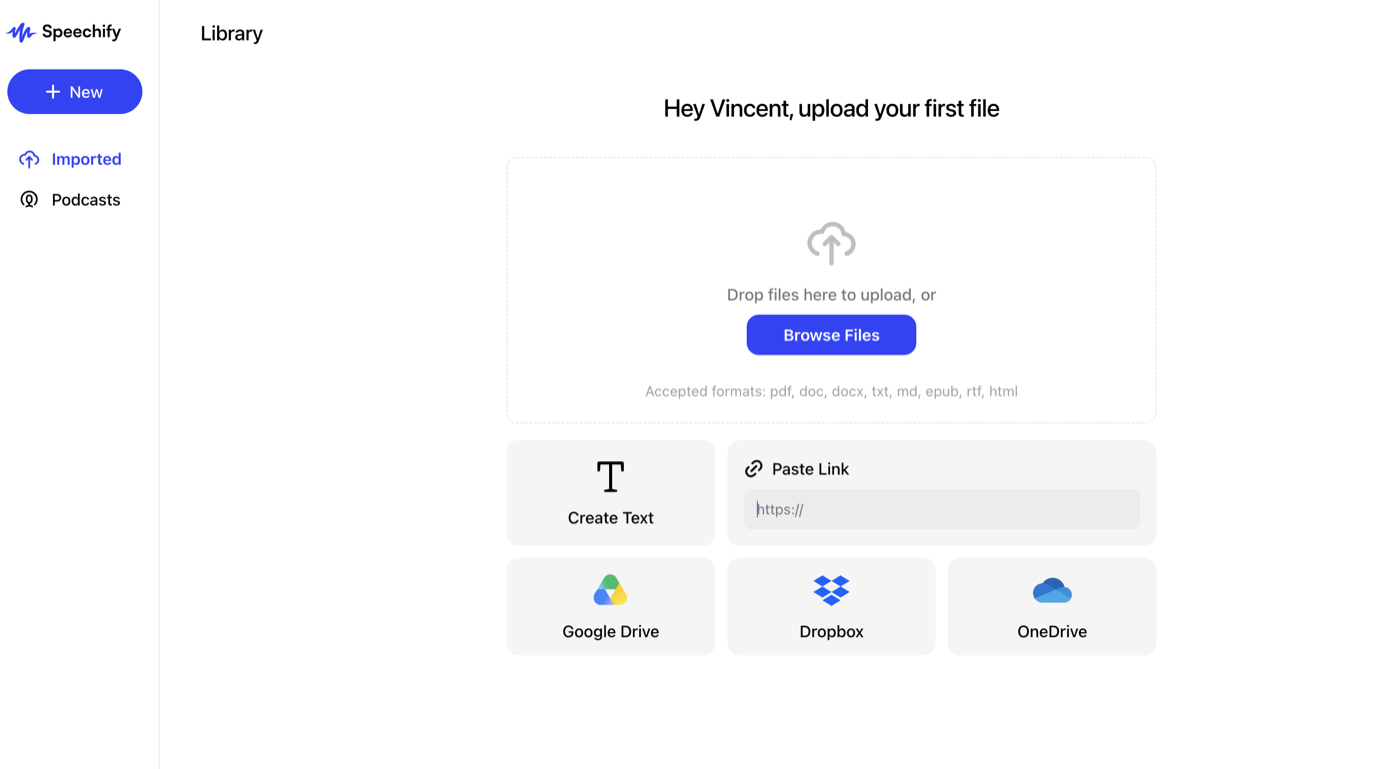
Inside our Speechify library — logged-in app on our own account. Import formats shown: pdf, doc, docx, txt, md, epub, rtf, html, plus Drive/Dropbox/OneDrive and paste-a-link. Captured Jul 3, 2026.
Speechify's Podcasts feature, in-app: “Turn your file into an AI-powered podcast, debate, lecture, or late-night show” — the consumption-to-production bridge unique to Speechify on this bench. Captured Jul 3, 2026.
Our test: Same 90-sec podcast intro, identical script. The unedited output and timings publish here as this round completes — no cherry-picking, no vendor-supplied demo reel.
What Speechify actually is in 2026
Speechify is two products wearing one brand, and the pricing confusion starts there. The flagship is a listening app: it takes articles, PDFs, emails, and scanned pages and reads them to you at up to 5x speed across phone, browser, and desktop. That product is Speechify Premium, listed at $29 a month. Tucked behind a separate link is Speechify Studio — a voiceover, dubbing, and avatar production suite that competes with ElevenLabs and starts at $19 a month. A newer in-app Podcasts feature pushes past pure listening: it turns an uploaded file into an AI-generated podcast, debate, lecture or late-night-show format — we verified the feature in our own account (screenshot below).
The distinction that matters is consumption versus production. Premium exists so you can consume text as audio; Studio exists so you can produce audio files you publish. Reviews that blur the two end up recommending the wrong subscription. Speechify's roots are in accessibility — founder Cliff Weitzman built it around his own dyslexia — and the listening product still reads as the company's center of gravity, with Studio as the newer creator-facing wing.
Where it wins, where it stumbles
As a listening tool, Speechify has few direct peers. The 5x playback Premium advertises is the product's whole identity: voices tuned to stay intelligible when accelerated, a Scan & Listen camera feature for paper, and Google Drive, Dropbox, and OneDrive integrations so nearly anything with words in it becomes a queue item. For students, lawyers, and anyone facing a heavy reading load, that single-queue workflow is the draw, and the free tier's deliberately flat voices make the upgrade case for you.
Production is a different story. In our ranking for narrative delivery — criteria laid out in how we test — Studio's voices sit below ElevenLabs for emotional range and pacing control, which tracks with their design goal: comprehension at speed, not performance. Studio does bundle a lot for the price — voiceover, dubbing, a voice changer, plus stock music, video, and images — but it is a generalist tool rather than a deep one.
The Studio credit system, decoded
Studio meters by time, not words or characters: 1 credit buys 1 second of voiceover, dubbing burns 3 credits per second, and avatar video burns 30 per second. That makes the math unusually clean. Studio Starter's 7,200 monthly credits equal exactly two hours of finished voiceover — about $0.16 per minute on the $19 plan. Studio Creator's 28,800 credits stretch to eight hours, dropping the rate near $0.10 per minute.
Worked example: a 10-minute YouTube narration costs 600 credits, so Starter covers roughly 12 such videos a month with credits left over. Switch to dubbing and the same plan yields only 40 minutes; generate an avatar presenter and 7,200 credits are gone in four minutes. The 30x spread between voiceover and avatar rates is the biggest gotcha on the plan, so know which mode you will actually live in before picking a tier.
Pricing in July 2026 (verified)
Speechify splits pricing across two pages — speechify.com/pricing for the listening app and speechify.com/pricing-studio for the production suite. Both were fetched directly; here is what they list.
Verified on Jul 3, 2026. One caveat: the Premium annual dollar figure is not printed on the page — the toggle shows only the discount percentage — so confirm the exact yearly charge at checkout. Studio's yearly option is advertised as "7 Months Free" without per-month figures shown.
- Speechify Free (listening): $0 — 10 robotic-sounding voices, speeds up to 1.5x, text-to-speech features only
- Speechify Premium (listening): $29/month — 1,000+ voices, 60+ languages, 5x speed, AI summaries and podcasts; annual toggle advertises "SAVE 60%"
- Studio Free: $0 — 600 credits, 1,000+ voices, no voice cloning, no commercial usage rights
- Studio Starter: $19/month — 7,200 credits, voice cloning, commercial usage rights, stock music/video/image library
- Studio Creator: $49/month — 28,800 credits, everything in Starter
- Credit rates: voiceover 1 credit/second, dubbing 3 credits/second, avatar 30 credits/second
The free-tier catch: no commercial rights
Studio's free plan hands you 600 credits — ten minutes of voiceover — but stamps the output "No commercial usage rights." No monetized YouTube channel, no client work, no course you sell can be built on free-tier audio. The $19 Starter plan is the real floor for anything commercial, and it also holds voice cloning behind the same paywall.
The listening app's free tier is weak in a more ordinary way: 10 voices Speechify itself labels "robotic sounding" and a 1.5x speed cap. It functions as a demo of the interface, not the product. The license logic runs the other direction too — Premium is sold as a listening subscription, while the plans carrying explicit commercial usage rights live on the Studio side, so route audiobook or e-learning production work there rather than trying to repurpose the reader.
Who should subscribe — and who shouldn't
Subscribe to Premium if your problem is input: a reading pile you will never clear by eye. At $29 a month — considerably less on the 60%-off annual toggle — it is priced like a serious productivity tool, and heavy readers use it like one. Subscribe to Studio Starter if your problem is output on a budget: two hours of commercially licensed voiceover for $19 undercuts much of the AI voice field on straight dollars per minute.
Skip Studio if delivery quality is your product. Narration with character work, drama, or premium podcast polish belongs with ElevenLabs, which costs more per minute of finished audio but leads our ranking for expressiveness. And if all you want is basic document listening without AI extras, NaturalReader or the free read-aloud built into Edge covers the floor — Speechify's paid case rests on the 1,000-voice catalog, 60+ languages, and the everything-in-one-queue workflow.
What Trustpilot, G2 and Reddit users say
Fast, human support that grants refunds — the dominant Trustpilot theme
Voice quality (“the only one that truly sounds like a person” per G2)
Real accessibility value for ADHD/dyslexia users in Reddit threads
Billing and trial traps recur across platforms — charges after cancellation
Premium-voice word caps hit heavy users fast (“ran through my limit in 4 days”)
Glitches on long documents (skipped paragraphs) and heavy advertising
Note the small G2 sample (20 reviews on the Studio listing) vs Trustpilot's 6,591 — weigh accordingly.
Our bench's take: Fits our consumption-vs-production framing: superb for listening to documents, thinner as a production tool — which is exactly how we slot it on the voice bench.
Pricing, plainly
What you actually unlock at each tier.
Frequently asked
Sources checked
Official vendor pages used for pricing, rights and feature claims; checked Jul 3, 2026.
- Speechify pricing - listening plans and product tier positioning
- Speechify Studio pricing - credit costs per second (voiceover/dubbing/avatar), plan credits, commercial rights
Speechify questions, answered
Go deeper on Speechify
Affiliate disclosure: ToolProven may earn a commission when you subscribe through links on this page, at no additional cost to you. We have not run our standard task on this tool yet — this page is verified research, not a hands-on test — and commissions never affect our score.